6502 Step 2
petscii c64 golangEndless loop programs not worth waiting for
Step 0, implement cycle counter and default to 1E9 cycles before stopping the emulator. It allows you to configure a value if you have other preferences but it should have a more clever int parser so I could write either 1E9, 10^9 or X for 2^X loops or even parse human readable strings like “1M” for a million. For now, it is bare ints with lots of zeroes.
Next steps
Started working on the next easiest part of the TODO list for the not-going-to-be-a-C64-emulator project of mine, and while loading BASIC and KERNAL rom files was easily done, it did not help my attempts to make kernal-printing programs really. I knew programs would normally be able to jump carelessly to $FFD2 and the default output device would be the screen for all printed bytes, but that function seems to do more than just flip some bytes.
So I set my hope to the SCINIT/FF81 function in the Kernal jump table to set stuff up, in the hopes that it would initialize the various zeropage locations used for knowing where the cursor is and so on, but nopes. No such luck today.
Next thought was “Perhaps, if I steal a copy of a working zeropage setup would the values be correct and usable”, or perhaps this does need interrupts to fire, I don’t know yet, but grabbing a copy of zeropage seemed easiest but it didn’t really help either. Nice to have function, but still not good enough for $FFD2 printing.
Printing the screen
Everyone knows that printf-debugging is required at some point, so I had to implement a screen-ram printer for text output, and it ended up quite ok.
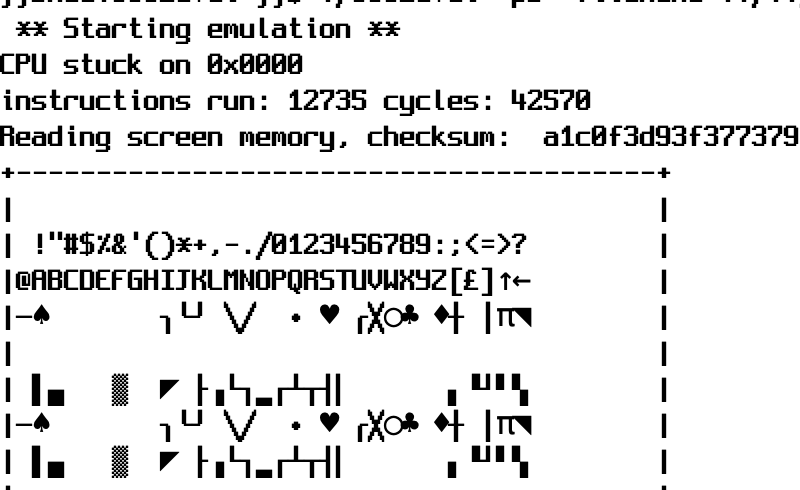
After making a huge nice map of C64 petscii -> unicode, I realized I got the wrong keymap implemented, which means the standard 38911 BASIC BYTES FREE lines don’t show up as they should. Grr. After wondering why my small test program would print a nice A in the corner ($0400) of the screen in VICE but not here, I remembered the screen codes are not petscii, so 0x01 in $0400 is an A, but PETSCII has A at 0x41. Oh well, something to fix for later.
Need more dumps
So after not seeing the A, I had to add a “dump screen ram in hex” in order to see what really happens, but I kept the hex dumper version. It was kind of easy to implement, so I made a stack dumper, in case I need to find out what stuff gets left there.
The toy6502 implementation had quite a decent disassembler, so uppercasing that func call so the go module exports it and then a -d option appeared, allowing my programs to print out each ASM statement as they run. Not a totally bad option, unless your program goes into an endless spin of course, but as a poor-man-single-step it is quite nice.
TODO
- 6510 illegal ops
- Possibility to emulate interrupts
- Some web service: upload your prg, get a checksum back
- OpenBSD pledge/unveil support for such a web service
- Additional 65xx platform loaders, VIC20? AtariXL?
Print out the screen memory after the runOption to load kernal and basic romsInitialize zeropage to look more like a running C64- Single step instructions or breakpoints
- Get a range of test programs from KickC regression tests and other places to compare known-good checksums for the future